3. Quick Start
The easiest way to start using the package is to install it using pip install rainfallqc.
Note
To use RainfallQC in a project, the syntax will be like:
import polars as pl
import rainfallqc.gauge_checks

data = pl.read_csv("path/to/your/rain_gauge_data.csv")
flags = rainfallqc.gauge_checks.check_intermittency(data, target_gauge_col="rain_mm")
All quality control checks in the RainfallQC package begin with check_
3.1. Content overview
RainfallQC contains five modules:
gauge_checks- For detecting abnormalities in summary and descriptive statistics.comparison_checks- For detecting abnormalities by comparing to benchmark data.timeseries_checks- For detecting abnormalities in patterns of the data record.neighbourhood_checks- For detecting abnormalities based on measurements in neighbouring gauges.pypwsqc_filters- For applying quality assurance protocols and filters for rainfall data.
You can find a jupyter notebook with an easy-to-follow example here
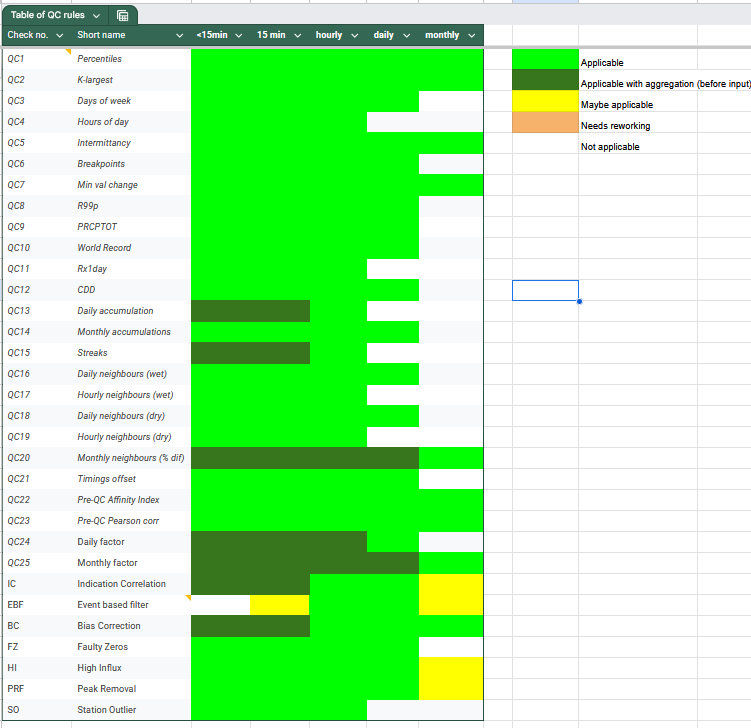
3.2. Which checks are suitable for my data’s temporal resolution?
As you can imagine, not all quality control checks are suitable for all temporal data resolutions (e.g. 15 min, hourly, daily, monthly). Therefore, we have created a table that shows which checks are suitable for which temporal data resolutions, and which can be applied after aggregating data to a coarser temporal resolution.